













HTTP 103 Early Hints is designed to help browsers begin fetching important resources before a server has finished preparing its final response.
The idea is straightforward: if the server already knows that a page will require a particular stylesheet or other important resource, it can provide that information while the main response is still being generated.
In practice, however, diagnosing Early Hints behavior can be confusing. Developers may see the expected response headers without observing the anticipated resource-loading behavior.
Chrome’s October 2026 DevTools updates introduce clearer warnings when Early Hints preloads are ignored because the Network panel’s Disable cache option is enabled.
The improvement is documented in Google’s October 20 overview of DevTools changes delivered with Chrome 155 and Chrome 156.
What Is HTTP 103 Early Hints?
HTTP 103 is an informational response status. It allows a server to send preliminary headers before the final response becomes available.
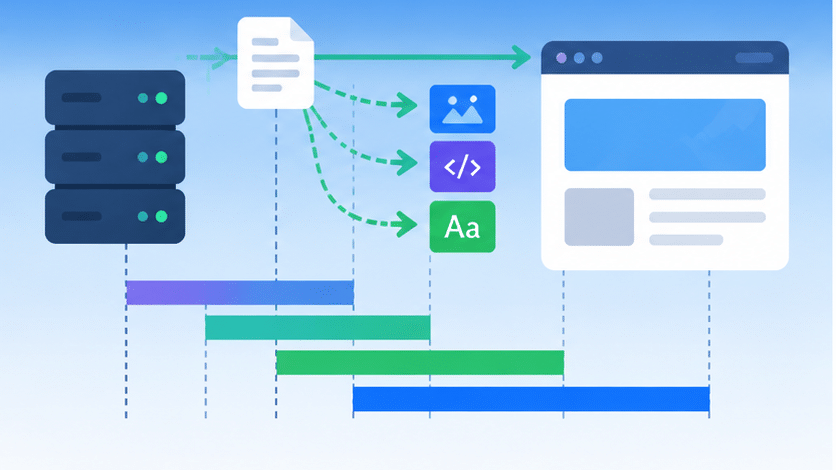
Consider a page that requires a stylesheet and a web font.
Normally, the browser may need to wait for the HTML response before discovering those resources.
With Early Hints, the server can advertise selected resources sooner, potentially allowing the browser to begin useful network activity while the application continues generating the page.
A simplified HTTP exchange might look like this:
HTTP/1.1 103 Early Hints
Link: </assets/site.css>; rel=preload; as=style

HTTP/1.1 200 OK
Content-Type: text/html

<!doctype html>
<html>
    <head>
        <link rel="stylesheet" href="/assets/site.css">
    </head>
    <body>
        <h1>Example page</h1>
    </body>
</html>
The 103 response is not the final document. It is an opportunity for the browser to act on selected hints before receiving the final 200 response.
Actual behavior depends on browser support, transport infrastructure, cache state, and the type of resource being hinted.
Why Early Hints Can Be Difficult to Test
Developers commonly enable Disable cache in Chrome DevTools while debugging websites.
This is useful when testing changes to JavaScript, CSS, or other resources without interference from previously cached versions.
However, the setting also affects Early Hints preload behavior.
Chrome documents that Early Hints preloads are ignored when Disable cache is enabled.
This creates a subtle debugging problem: a developer may correctly configure Early Hints on the server, open DevTools, disable caching, and conclude that the feature does not work.
The server configuration may be correct. The testing environment may be responsible for the observed behavior.
The New DevTools Warning
Chrome now provides a warning in the Early Hints headers section when a 103 response includes preload links while Disable cache is active.
The warning explains why Chrome ignores those preloads.
This is a relatively small interface improvement, but it addresses an important distinction between application behavior and debugging-tool behavior.
Without that explanation, developers may spend time changing server configuration, CDN settings, or response headers when the immediate issue is simply a DevTools option.
A Practical Debugging Procedure
To investigate an Early Hints implementation, begin by opening Chrome DevTools and navigating to the Network panel.
Reload the page and inspect the main document request.
Check the response headers for the Early Hints section and verify that the expected Link preload declarations are present.
Next, inspect the Disable cache setting. If it is enabled, repeat the test with caching allowed.
Compare resource timing information across multiple runs, ideally using a consistent network profile.
When evaluating production performance, also test without DevTools open and use representative browser conditions. Development tooling can affect resource loading and execution timing.
Early Hints Is Not a Universal Performance Improvement
Early Hints is most useful when the server can identify important resources before completing a relatively expensive response.
If the final HTML response arrives almost immediately, the opportunity for improvement may be limited.
Incorrect resource hints can also introduce unnecessary requests or compete for bandwidth with more important resources.
For example, preloading a stylesheet that is not actually required by the resulting page may consume bandwidth without improving rendering.
Developers should therefore treat Early Hints as a targeted optimization rather than a feature that should automatically be enabled for every resource.
Other Network Panel Improvements
The same DevTools update includes several additional improvements to the Network panel.
Local response-body overrides now persist across page navigations. Custom request and response header columns, including their sort order, also persist across reloads.
Developers can additionally copy truncated raw request payloads through the context menu.
These changes do not alter HTTP behavior, but they make repeated debugging sessions more convenient.
Conclusion
Chrome’s new Early Hints warning is a reminder that debugging tools are part of the environment being tested.
A browser setting intended to simplify development can sometimes change the behavior developers are trying to observe.
For teams experimenting with HTTP 103, the improved diagnostic makes it easier to distinguish a server configuration problem from a browser testing condition.
The larger lesson remains unchanged: web performance optimizations should be measured under representative conditions, not judged solely by whether a response header appears in DevTools.